
Introduction
Microsoft has made the decision to retire UM in both the latest version of Exchange On-premises (2019) and Exchange Online and will be replacing it with their Azure hosted service, Cloud VoiceMail. Depending on an organisation’s intended roadmap, what they need to do and what options available to them are different.
This post attempts to serve as an architectural reference and a starting point for discussions about the way forward for organisations and their Microsoft Voicemail service.
Support Matrix
The following table lists version interoperability and supported topologies for Voicemail showing the component responsible for voicemail processing in each scenario.
In every topology the user can expect voicemail to be deposited into their mailbox in Exchange.
| Exchange 2013 | Exchange 2016 | Exchange 2019 | Exchange Online | |
|---|---|---|---|---|
| Skype for Business 2019 | Exchange 2013 UM | Exchange 2016 UM | Cloud Voicemail | Cloud Voicemail |
| Skype for Business 2015 | Exchange 2013 UM | Exchange 2016 UM | Cloud Voicemail | Cloud Voicemail Exchange Online UM[1] |
| Lync Server 2013 | Exchange 2013 UM | Exchange 2016 UM | Not Supported | Cloud Voicemail Exchange Online UM[1] |
Scenarios
There are several scenarios that organisations may find themselves in with their migration. I have detailed four high level scenarios below. While none of these scenarios take hybrid configurations into consideration they should still be able to function as a starting point for discussions.
It should be noted:
- Exchange 2013 ends extended support on 4/1/2023 and is already out of mainstream support.
- Exchange 2016 ends extended support on 14/10/2025 and ends mainstream support 13/10/2020.
Scenario 1: The organisation is on Lync 2013 or Skype for Business 2015 and currently use Exchange UM 2013 or 2016 for Voicemail. Their plan is to migrate the Skype for Business platform to 2019 and leave Exchange as is. In this scenario both SfB instances are supported to talk to Exchange 2013.
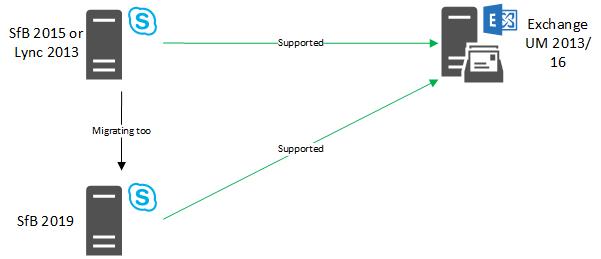
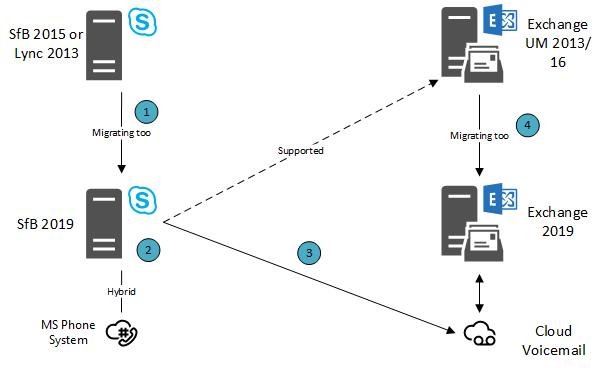
Scenario 2: The organisation is on Lync 2013 or Skype for Business 2015 and currently use Exchange UM 2013 or 2016 for Voicemail. Their plan is to migrate the Skype for Business platform to 2019 and migrate to Exchange 2019. In this scenario there is a specific migration path that must be followed for users not to lose their Voicemail services. It is also a requirement that SfB 2019 been in a hybrid setup with SfB Online. The migration path is as follows:
- Migrate Skype for Business services from 2015 to 2019.
- Configure SfB Hybrid, if not already in place.
- Configure and assign a hosted voicemail policy and enable users for Cloud Voicemail.
- Migrate Exchange from 2013/2016 to 2019.
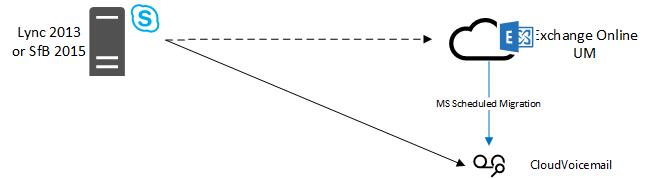
Scenario 3: The organisation is on Lync 2013 or Skype for Business 2015 and currently use Exchange UM Online for Voicemail. In this scenario Microsoft plan to schedule the migration from Exchange UM Online to Cloud Voicemail over the next 12 months. The organisation will receive a notification in their Office 365 notification centre once Microsoft have scheduled this. The existing hosted voicemail policy assigned to users will continue to work post migration.
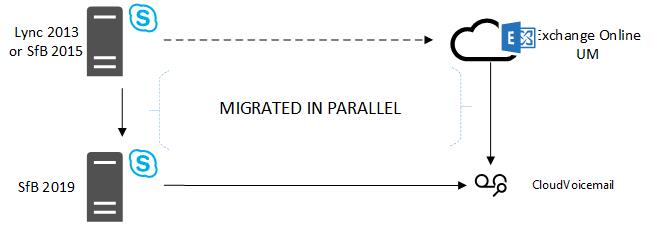
Scenario 4: The organisation is on Lync 2013 or Skype for Business 2015 and currently use Exchange UM Online for Voicemail. Their plan is to migrate the Skype for Business platform to 2019. In this scenario the organisation has no choice but to move their users voicemail as users migrate across to SfB 2019. This will happen automatically when the user is migrated.
[1] Until deprecated
 MuzzaTech